
Automation is the process of changing an aspect or quality of audio over time. For example, a simple automation could involve volume. The volume could fade out or decrease over time, which can be done by automation. Automation is an enormous aspect of modern music production. It is usually a very simple process, however the possibilities are endless. There are automations that are typical and commonplace, but you can automate just about anything you’d like. Today, I will explain the basics of this concept.
In a DAW, there are multiple ways to automate. The most common and easiest way is to utilize the draw tool. When the draw tool is activated, you can draw in what you want to have happen to your audio. In essence, you are drawing what will change, when it will start, when it will end or change again, and how long it takes to do it.
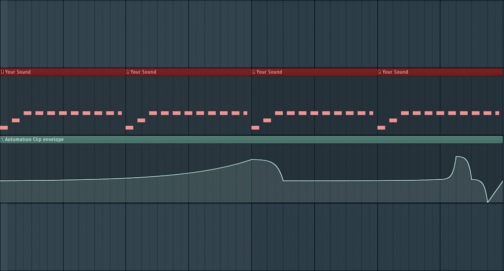
Photo Link: https://typhonicsamples.com/music-production-ep-2-automating/
In the photo above, there is a midi track on top in red. Click here to learn more about midi. Below it is an automation lane. This simply shows a visual representation of what is happening to the audio over time. When drawn in and shown visually, you can use horizontal, vertical, diagonal, and curved lines. You can have a single automation or stack multiple onto one track or onto your master track (all tracks). Any sound effect you add to an instrument can be automated to give it more flavor and to add variety to your overall project.

 Music Production - All You Need To Know