
Glides or slides is a popular and important quality in all kinds of music. Its importance comes from the fact that many instruments naturally slide, and for that it is an authentic and human part of music. When one note gradually slides into the next one without a distinct moment of change, it sounds smooth and natural. This is heard in most in string instruments. Today I will explain how to execute glides using a sampler. A sampler allows you to manipulate audio and turn it into your own separate instrument. There is a glide feature within almost every sampler that lets you glide notes. This is a process done in Midi. Click here to learn more about Midi. I use this feature the most for bass lines and 808’s.
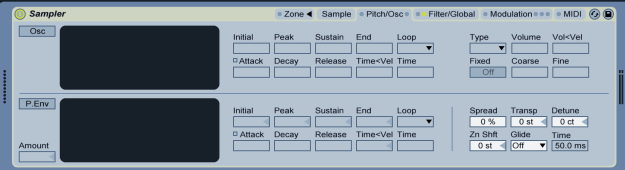
In Ableton’s sampler, the glide feature is on the bottom right. You’ll have the option between glide and portamento. Portamento provides a very similar effect. I generally stick to the glide effect. Once turned on, you’ll need to set the time parameter. The higher the time, the longer it will take for one note to slide up or down to the next note. For bass lines, the lower 100’s is typically appropriate. It is very important when programming glides, that the notes overlap. If you have the glide feature turned on with the time parameter set to a high enough time, but the two notes do not overlap, there will be no glide. When two Midi notes overlap, the sampler recognizes it. It will play whichever note is placed first, even if it is only by a fraction of a second. Then, whenever the next note is played, it will slide to it over the time you selected, opposed to ending the previous note and jumping to the next one. As I mentioned before, this is a great idea for smooth bass lines, but it is also great for things like strings, pads, and leads!

 Music Production - All You Need To Know